> For the complete documentation index, see [llms.txt](https://jrp.gitbook.io/notes/llms.txt). Markdown versions of documentation pages are available by appending `.md` to page URLs; this page is available as [Markdown](https://jrp.gitbook.io/notes/design-pattern/behavioural-chain-of-responsibilities.md).
# Behavioural - Chain Of Responsibilities
Chain of Responsibilities pattern allows multiple objects to process the request without the sender needing to know which object processed the request.
Suppose you have some issue with your office laptop. You went to IT helpdesk and asked help.
L1 (Help desk) checked wifi settings and restart laptop. The issue didn't get resolved.
L1 asked L2 (specialist) to check. L2 updates your drivers or remote accesses to fix deeper issues. Still the problem is not resolved.
L2 asked L3 (Engineer) to check. The engineer Investigates network infrastructure and fixes policy or server errors. Your issue got resolved.
You collected the laptop from IT help desk, without knowing who resolved the issue.
That's chain of responsibilities.
The sender just sends the message to a processor and processor handles it.
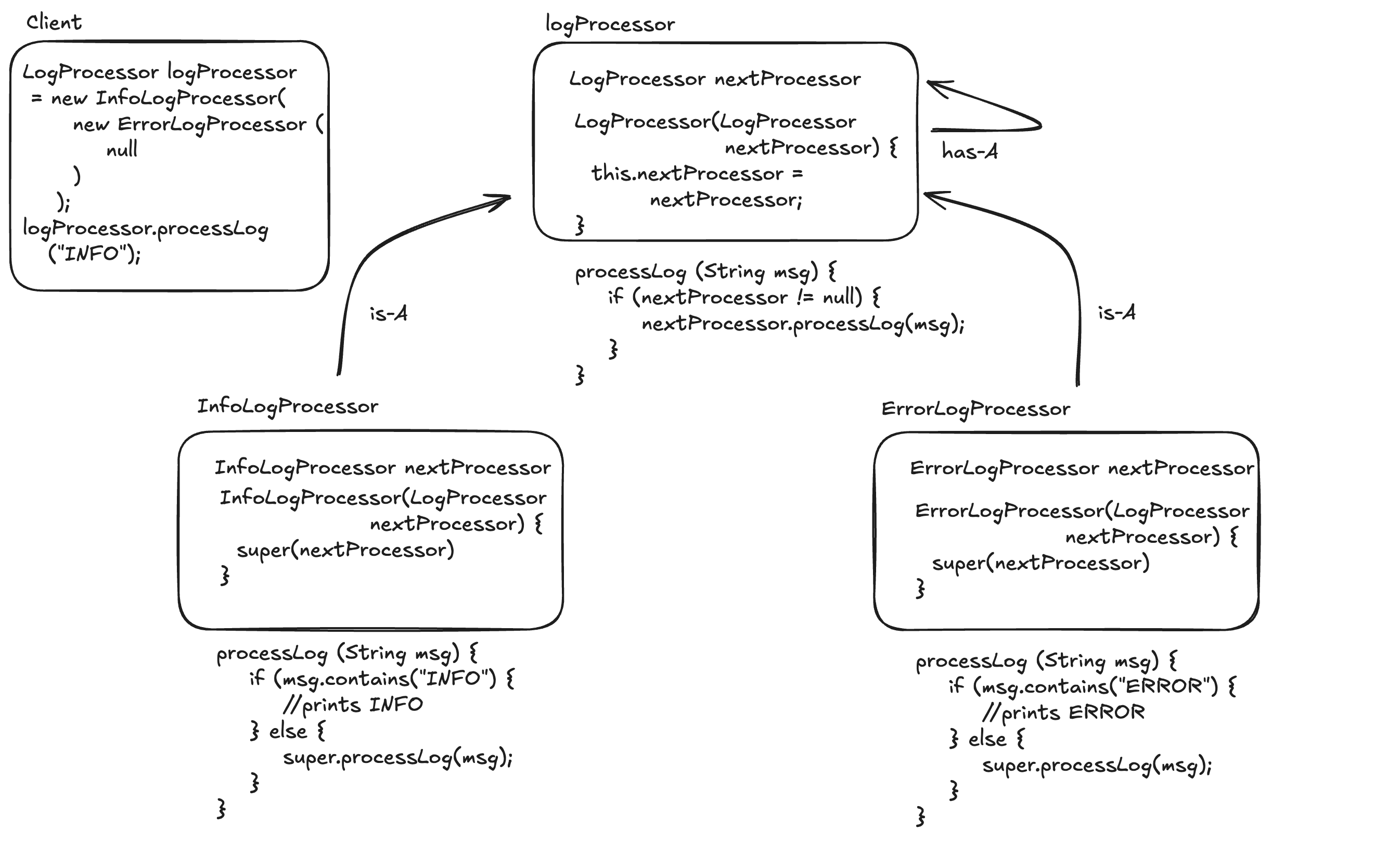
### Low Level Design
Chain Of Responsibilities
### Implementation
```java
public class LogProcessor {
LogProcessor nextLogProcessor;
LogProcessor(LogProcessor nextLogProcessor) {
this.nextLogProcessor = nextLogProcessor;
}
protected void processLog(String message) {
if (this.nextLogProcessor != null) {
nextLogProcessor.processLog(message);
}
}
}
```
```java
public class InfoLogProcessor extends LogProcessor {
InfoLogProcessor(LogProcessor nextLogProcessor) {
super(nextLogProcessor);
}
@Override
public void processLog(String message) {
Objects.requireNonNull(message);
if (message.contains("INFO")) {
System.out.println("Processing INFO");
} else {
super.processLog(message);
}
}
}
```
```java
public class ErrorLogProcessor extends LogProcessor {
ErrorLogProcessor(LogProcessor nextLogProcessor) {
super(nextLogProcessor);
}
@Override
public void processLog(String message) {
Objects.requireNonNull(message);
if (message.contains("ERROR")) {
System.out.println("Processing ERROR");
} else {
super.processLog(message);
}
}
}
```
#### Client
```java
public class Client {
public static void main(String[] args) {
LogProcessor processor =
new InfoLogProcessor(new ErrorLogProcessor(null));
processor.processLog("INFO : Hello World");
processor.processLog("ERROR : Some error occurred");
}
}
```
Happy Design :smile: